Choose Your Plan
Choose a Data Plan Self-Serve Lead Generation Platform.It converts anonymous website traffic to actionable leads the very next day. How often do you want new leads emailed to you?
Monthly Leads 12 Month Subscription
FEATURES:
- The first 1,000 Leads each month are included.
- Additional Leads cost $100 per thousand.
- Scripts provided for one website
- Monthly Leads
Weekly Leads 12 Month Subscription
FEATURES:
- The first 1,000 Leads each month are included.
- Additional Leads cost $100 per thousand.
- Scripts provided for one website
- Monthly Leads
- Weekly Leads
Daily Leads 12 Month Subscription
FEATURES:
- The first 1,000 Leads each month are Included.
- Additional Leads cost $100 per thousand.
- Scripts provided for one website
- Monthly LeadsWeekly Leads
- Weekly Leads
- Daily Leads
- Integration with CRM
- Coming Soon! Automatically trigger Emails to your site's visitors.
Our system allows an organization to collect information about anonymous visitors to their website and turn that information into named leads.
- We collect Web Traffic to your website.
- We convert that traffic into Names, Addresses, Emails and Phone Numbers.
- We rank each visitor according to how well they match our database records.
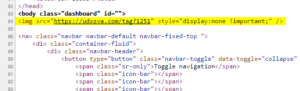
Website traffic collection involves the placement of a Web Visitor Attribution tag (WVA). The tag is tiny bit of code that can be copied during the registration process and then pasted into the header code of the HTML of your website. It looks like the following:
<img src="https://udxwva.com/tag?id=XXXXX" style="display:none !important;" />
The tag collects the IP and device information for each individual visitor and the pages they go to on your website. The information it collects is automatically transferred to a secure cloud server in encrypted form. The raw file is secure behind an account that is only accessible in summary form after traffic has been matched.
matching the IP address to household or business information contained in our proprietary database.
We compare the IP addresses and other information collected our proprietary database by matching the IP Address to household or business information that is already in our database.
When a match is made – each match is scored for its accuracy. A Confidence Factor is assigned through the Leads workflow based on a series of criteria that determines whether the IP is a Direct, Indirect, or Shared Match to a household or business.
You’ll want to put the Tag on every page of your website. Most websites have a header file that is already on every page of your website. In the header file locate the opening <body> tag and paste the Tag code directly after it. You’ll be able to manage which pages are tracked
Tab Content
Each Day, Week, or Month depending on your subscription, you will automatically be emailed a report with a zip file containing a spreadsheet of newly generated leads.
The format of the email and the file:
- Unique IPs: How many unique IPs were identified during the report period
- Matched Locations:How many of those IPs mapped to a directly identifiable business or household
- Shared IP Ranges: Range of IPs that support more than one business or household
- Match Rate: Number of IP that were counted as direct matches
- Consumer Matches: Number of Persons matched
- Business Matches: Number of Businesses matched
- Zip+4: Number of unique zip+4s matched
- Zip Codes: Number of Zip Code matched
- Cities: Number of Cities matched
- States/Provinces: Number of States (U.S.) / Provinces (Canada) matched
The Daily, Weekly, or Monthly Email will be accompanied by a CSV file that can be loaded into Excel or to a Text Editor. The CSV file will contain the following columns:
CONSUMER
- NAME
- CONFIDENCE_FACTOR
- GENDER
- ADDRESS
- LONGITUDE/LATITUDE
- CITY
- STATE
- POSTAL
- HAS_EMAIL
- AGE_RANGE
- INCOME_RANGE
Business
- NAME
- CONFIDENCE_FACTOR
- ADDRESS
- CITY
- STATE
- POSTAL
- LONGITUDE/LATITUDE
- WEBSITE
- NAICS_CD
- NAICS_DESC